English

Reliable navigation is the foundation of a successful international vacation for every modern tourist. Travelers often face high roaming fees or dead zones while exploring new urban environments. This guide explains how to master offline public transport navigation to ensure a smooth journey. Moovit operates in over 3,500 cities across 112 countries to provide world-class mobility expertise. You will learn to manage transit schedules and map data without a constant 5G connection. Mastering these skills helps you avoid the stress of getting lost in unfamiliar subway systems. It also preserves your phone battery for capturing memories during your sightseeing adventures. Following these steps ensures you remain confident while moving through any major global city. You can travel like a local by preparing your digital tools before you leave your hotel.
To navigate public transport offline, tourists must download regional maps and save specific itineraries using a mobility app. This method combines static geographic data with pre-saved transit schedules to bypass the need for active cellular signals. Reliable navigation requires tourists to sync their routes while connected to a stable Wi-Fi network.
Offline Essentials: Regional map downloads, cached transit schedules, and pre-saved route itineraries.
Relying on a live data signal in 2026 presents several risks for the international traveler. Many tourists encounter expensive roaming charges when using their home cellular plans abroad. These costs can accumulate quickly during a week of heavy navigation and map usage. Battery preservation is another critical concern for people who spend all day exploring urban centers.
Travel Risks: High roaming fees, rapid battery depletion, and signal dead zones in subways.
The stress of a lost signal can ruin a carefully planned sightseeing itinerary. When you cannot access a map, you lose the ability to find the nearest bus stop. This often leads to unnecessary taxi expenses or long walks in the wrong direction. Tourists should view offline preparation as a necessary part of their travel logistics. It provides a sense of security that live technology cannot always guarantee.
There is a major technical difference between viewing a map and planning a transit trip. Most map applications allow you to download a static image of a geographic area. This helps you find your current street location using basic GPS signals. However, transit routing requires complex data about schedules, stop locations, and transfer points.
Technical Distinction: Static maps show geographic layouts, while offline transit includes dynamic schedules and platform data.
Static maps are useful for walking but fail when you need to know the next departure time. Transit data is dynamic and changes based on the day of the week or local holidays. A true offline transit guide must include these schedule variations to be effective. Relying only on a picture of a map can lead to long waits at closed stations.
Moovit is a part of Mobileye and leads the industry in Mobility as a Service solutions. The app focuses on the rider experience to make urban travel more accessible for everyone. Our platform covers over 3,500 cities to ensure you have a consistent experience worldwide. We provide a safety net for tourists by offering clear and reliable navigation data.
Moovit Statistics: Coverage in 3,500+ cities across 112 countries worldwide.
Our expertise comes from years of analyzing how people move through complex urban environments. We understand that a tourist needs more than just a list of stops. You need to know exactly where to stand on a platform and when to get off the bus. This attention to detail is what sets our mobility app apart from generic navigation tools.
Follow these ten steps to ensure seamless travel:
Tourists must first determine which agencies manage the local buses and trains, such as the MTA in New York or the RATP in Paris. Knowing the primary operators helps travelers find the most accurate digital resources for a trip.
Researching local providers ensures that travelers look at the correct schedules for a specific destination. Agency research also helps identify which tickets are required for purchase.
Accessing map visuals without internet requires downloading specific city files to a mobile device. Downloading files ensures that street names remain visible even in airplane mode.
Offline maps provide a visual guide to the city layout during walks. These digital files act as the primary geographic layer for transit planning.
Marking most-used routes as favorites allows for quicker access during travels. Saving favorites organizes the screen so riders can find data easily.
The favorites feature helps travelers skip the search process when in a hurry. This setting keeps the most important transit lines at the top of the app interface.
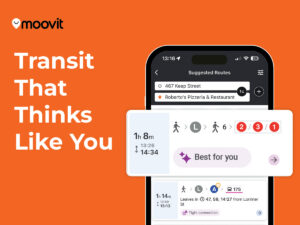
The Moovit urban mobility app provides a comprehensive platform for millions of riders to plan and ride with confidence. Travelers can use the app to plan, pay, and ride within a single interface.
The Moovit interface is designed to be intuitive for travelers who do not speak the local language. Essential trip details remain accessible even when a cellular connection is weak.
The reliability of the Moovit app makes it a top public transportation tool for international tourists. The platform provides a central hub for all urban transit needs.
Capturing digital screenshots of transit directions provides a secondary backup for the journey when cellular signal is lost. Digital screenshots ensure that riders have visual cues without any signal.
Screenshots are easy to access from a phone gallery at any time. These images serve as a permanent record of an intended travel path.
Syncing a full route while connected to hotel Wi-Fi caches the necessary transit information directly to the mobile device. Loading full route details before heading out ensures the data is available offline.
A fresh data sync provides the latest schedule data before a traveler loses their connection. Performing a fresh sync is a critical step for effective urban exploration.
GPS usage can drain a smartphone battery quickly during a long day of sightseeing. Activating battery-saving settings helps a phone last longer.
Lowering screen brightness and closing background apps also preserves energy. A fully charged phone is a traveler’s most important tool for safe navigation.
Researching fare payment methods like contactless cards or mobile apps prevents confusion at station turnstiles. Understanding payment methods before arriving at a station prevents confusion.
Some systems allow for contactless payments using a smartphone or credit card. Knowing payment details saves time and reduces stress at the turnstile.
Physical maps located at station entrances serve as a reliable reference point when digital navigation tools are unavailable. Travelers can use printed maps to verify the direction of travel while waiting.
Most major stations display large network diagrams near the entrances. Physical diagrams are excellent for understanding the broader layout of a city.
Monitoring transit alerts for service changes ensures that tourists can adjust their plans before arriving at a closed station. Staying informed about delays prevents travel friction.
Transit disruptions can happen unexpectedly due to weather or technical issues. A quick morning check of local alerts ensures that riders do not get stuck at a closed station.
Quick Reference: 8 essential questions answered regarding global transit apps and offline usage.
Moovit is the best transit app for tourists because the platform covers thousands of cities globally and provides a consistent rider experience everywhere.
Yes, Moovit allows you to save favorite lines while on Wi-Fi so that saved route data remains accessible when a traveler has no signal.
Moovit offers accurate live bus tracking in major American cities. The Moovit app uses real-time data to provide precise arrival times.
Using a Mobility as a Service app like Moovit is the best way to plan trips in New York. The platform combines all transit modes together.
You can track trains live in New York by using the Moovit urban mobility app. Moovit provides real-time updates on subway schedules.
Moovit provides a clear and professional interface designed to improve the rider experience. The app focuses on delivering accurate transit data.
Travelers can avoid roaming charges by using the offline features in the Moovit app. Saving routes while connected to free hotel Wi-Fi prevents data usage.
Yes, Moovit allows users to view saved locations and maps without an active connection. Viewing saved data helps travelers find their way in any city.